


KTLA 5 News Los Angeles
3.11.84K Reviews
App Specs
- Version
- 510.0.1
- Updated On
- License
- Free
- Downloads
- 100,000+
- Developer
- Nexstar Inc.
- Categories
- News & Magazines
- Platform
- Android
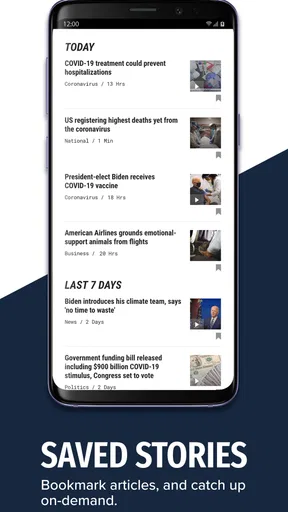
Screenshots
 Analysis by AppCompare
I use a local news app differently from a national news reader: I want a quick sense of what is happening nearby, then enough context to decide whether I should keep reading or watch coverage unfold. That is the role KTLA 5 is best suited to fill. It focuses on Southern California, combining written updates with live video and breaking-news notifications. If Los Angeles-area reporting is part of your daily routine, that regional focus is the main reason to consider it.
A local-first tool, not an all-purpose news desk
The distinction matters when choosing a news app. A national aggregator can bring headlines from many publishers into one feed, which is useful for comparing coverage across the country. KTLA 5 is a more direct route to one local newsroom’s reporting. I find that approach easier when I want to follow a developing story in the area rather than scan a broad mix of unrelated headlines.
That focus is also a limitation. If you live outside Southern California or want a single app for international, national, and local news, a general news reader is likely a better fit. The local emphasis gives the app a clear purpose, but it does not make it a replacement for every other source. I would treat it as a regional companion, not my only window on the news.
Where the live coverage fits into a normal day
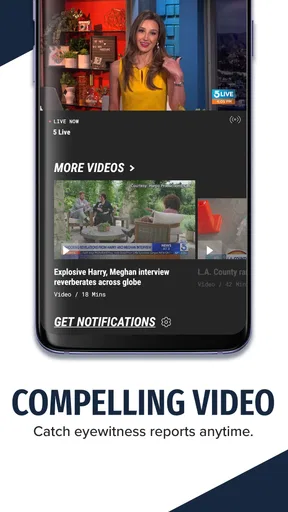
A practical use is checking headlines before leaving home, then opening a live broadcast when a developing local story needs more than a short article. For example, if I see an alert while getting ready for work, I can read the update first and decide whether watching coverage is worthwhile. That is more useful than receiving a notification with no easy next step, especially when a story is changing quickly.
Live video is not always the right choice. It needs more attention than a short written update, and streaming can be inconvenient when I am commuting, sharing a quiet room, or trying to conserve mobile data. In those moments, I would read first and save the broadcast for a stable connection or a time when I can listen. The combination of formats is a strength, but choosing the right one for the situation makes the experience less distracting.
Getting useful alerts without letting them run your day
Breaking-news alerts can help when a local event affects plans, but every alert does not deserve immediate attention. I recommend starting with notifications enabled only if you genuinely want prompt updates, then adjusting them if the interruptions become more noise than help. A useful habit is to open an alert when you have a moment to read the story rather than treating each buzz as something that requires an instant response.
There is a trade-off between speed and calm: notifications put news in front of you, while checking the app on your own schedule gives you more control. If you prefer a quiet phone, you can still use KTLA 5 as an intentional check-in instead of relying on alerts. That makes the app a better fit for people who want local reporting available on demand without being pulled into every developing headline.
Worth Reading Before You Choose

EA SPORTS FC Mobile 26 Is a Bigger Football Game, but It Takes Time

Flipboard Shows What News Apps Must Do Beyond the Feed

Switching to Android Auto Means Rethinking Your Driving Routine

Google Calendar Makes a Crowded Week Easier to Manage

Ludo King Makes the Most of the Minutes Between Plans

Baby Panda World Brings Quick Play to Modern Phones, but Its Game Library Feels Busy
For a household, the regional focus can also make the app useful as a shared reference point. One person can check a story and pass along the relevant update, rather than forwarding a string of unverified social posts. I would still read the article or watch the segment before sharing, especially when details are changing. That small pause helps separate an early alert from the fuller explanation that follows.
The User Experience
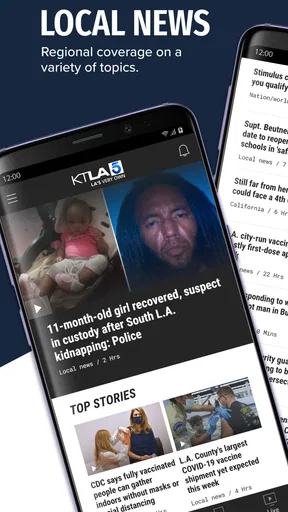
First things first, let's talk about the user interface. The KTLA 5 app is clean, intuitive, and super easy to navigate. You don't need a degree in tech to find your way around. The home screen is well-organized, giving you quick access to breaking news, weather updates, and live broadcasts. It's like walking into a well-lit room where everything is exactly where you'd expect it to be.
The app loads pretty quickly, which is a blessing when you're in a rush to catch the latest headlines. I mean, who has time to wait around these days, right? The menu is straightforward, with options to explore different categories like local news, entertainment, and sports. It's like having your favorite newspaper sections at your fingertips.
Content Quality and Variety
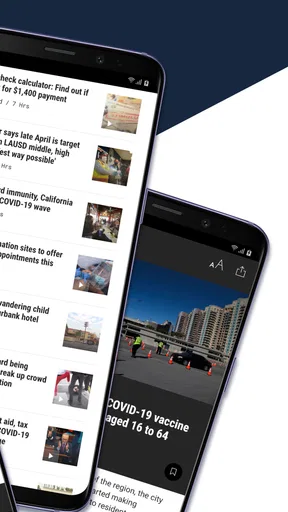
Now, let's get into the meat of the app—the content. KTLA 5 does a fantastic job of keeping the content fresh and engaging. The articles are well-written and concise, perfect for those quick reads during your coffee break. Plus, they cover a wide range of topics, from hard-hitting news to feel-good stories, ensuring there's something for everyone.
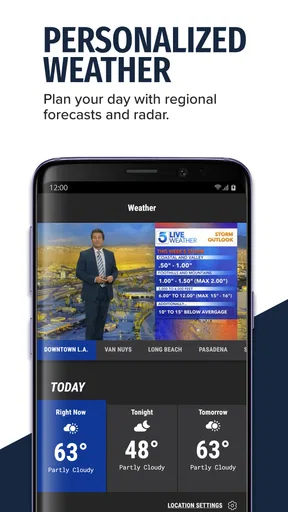
The video content is top-notch, providing crisp visuals and clear audio. Whether you're watching a live newscast or a recorded segment, the quality is consistent, making it easy to stay informed on the go. And if you're someone who loves to stay updated on the weather, KTLA 5 has got you covered with detailed forecasts and real-time alerts.
Personalization and Notifications
One of the standout features of the KTLA 5 app is its personalization options. You can customize your news feed to focus on the topics that matter most to you. It's like building your own personalized newspaper, tailored to your interests.
And let's not forget about the notifications. The app sends timely alerts for breaking news, which is perfect if you hate missing out on important updates. However, it might be a bit overwhelming if you're not a fan of constant pings. But hey, that's what settings are for, right?
Community and Engagement
What I love about the KTLA 5 app is its strong community focus. The app encourages user interaction through comments and social media sharing, making it easy to engage with other news enthusiasts. It's like being part of a virtual newsroom where you can share opinions and insights.
Moreover, the app often features local stories that highlight community events and initiatives, fostering a sense of connection among users. It’s a great way to stay involved with what's happening in your neighborhood.
Who will get the most from it
I would recommend it first to people who live in Southern California, have family or work ties there, or simply want a local perspective on events in the region. It can also suit someone who has moved away but still wants an easy way to keep up with hometown coverage. The app’s mix of articles and broadcasts makes it useful whether you have a minute to scan a headline or more time to follow a story.
It is less compelling for readers who want extensive control over sources, a neutral feed assembled from many outlets, or a strong focus on areas beyond KTLA’s region. In those cases, I would use a multi-publisher news app alongside it, or choose one instead. The choice is not really about which format is universally better; it is about whether local Southern California coverage is a regular need.
Small habits that make the app easier to use
I find it helps to separate two jobs: use the feed for planned reading and alerts for stories that may need timely attention. If notifications feel too frequent, disabling them does not mean giving up the app; it simply changes it into a place you visit when you choose. Likewise, a live stream is best treated as a deliberate viewing option rather than background audio you assume will fit every moment.
When a headline matters, I would open the full report before sharing it or forming a firm view. A short alert is useful for awareness, but a fuller article or broadcast can add the detail needed to understand what has happened. This is especially practical for local developments, where an early update may be only one part of a story that continues to change.
What the rating and app history tell me
KTLA 5 is a free news app from Nexstar Inc. It has an average rating of 3.1 from around 4.9 thousand ratings, alongside roughly 1.8 thousand written reviews, so the response is mixed rather than universally enthusiastic. I would not use that score alone to decide whether it suits me: a regional news app can be valuable to someone who follows Los Angeles closely and much less useful to someone who does not.
The app first appeared on March 8, 2013, and its current version is 508.0.0. Those facts show that it has a long-running presence and continues to have a current release, but they do not establish what changed between versions. For existing users, the practical question is whether the current app still serves their daily routine: can they find local coverage, use the formats they prefer, and keep alerts at a comfortable level? I would judge any future release by those everyday outcomes rather than by a version number alone.
It has more than 100 thousand installs and is free, with a Teen age rating. It requires Android 7.0 or later. Those details make it straightforward to try on a compatible Android device, while the age classification is a useful consideration for families deciding whether the app is appropriate. As with any news source, I would also be mindful of the fact that breaking coverage can include upsetting subjects, even when the app is being used mainly for local updates.
What I would keep an eye on
For a current user, the most meaningful signs of improvement would be practical ones: clearer navigation, dependable access to stories and video, and controls that make alert frequency easy to manage. I would also want the app to remain useful for both quick reading and longer viewing, since those two habits are what distinguish it from a headline-only feed. These are expectations to watch for, not claims about changes already made.
Before installing, I would ask myself three simple questions: Do I care about Southern California news? Will I read or watch local coverage often enough to make a dedicated app worthwhile? Do breaking alerts help me, or would I rather check news on my own terms? If the answers point toward local coverage and flexible use, KTLA 5 is an easy option to try. If they point toward a broader, quieter, multi-source experience, another news reader will probably suit me better.
Overall, the KTLA 5 app is a solid choice for anyone looking to stay informed and engaged. With its user-friendly interface, diverse content, and customization options, it's like having a piece of Los Angeles in the palm of your hand. So, if you're ready to dive into the world of news with a fresh perspective, give the KTLA 5 app a download. Trust me, you won't regret it.
Pros
- User-friendly interface for easy navigation.
- High-quality live streaming of local news.
- Timely push notifications for breaking news.
- Comprehensive coverage of local events.
- Weather updates are accurate and detailed.
Cons
- Frequent ads can disrupt the user experience.
- Sometimes experiences streaming lags.
- Limited customization for notifications.
- Requires a stable internet connection.
- Occasional app crashes on older devices.
FAQs for KTLA 5 News Los Angeles
What features does the KTLA 5 app offer?
The KTLA 5 app provides a range of features including live streaming of news broadcasts, real-time weather updates, breaking news alerts, and access to on-demand video clips. Users can also personalize their feed to focus on local news, traffic reports, and other topics of interest, ensuring a tailored news experience.
Is the KTLA 5 app free to download and use?
Yes, the KTLA 5 app is free to download and use on both Android and iOS devices. While the app itself is free, it does include advertisements. Users can access a wide range of content without any subscription fees, making it accessible for everyone interested in staying updated with local news.
Does the KTLA 5 app require a lot of storage space?
The KTLA 5 app is designed to be lightweight and efficient, requiring minimal storage space on your device. It generally occupies between 30 to 50 MB, depending on the version and updates. This allows users to enjoy the app without worrying about excessive storage usage or impacting device performance.
Can I receive personalized notifications from the KTLA 5 app?
Yes, the KTLA 5 app allows users to customize their notification settings. You can choose to receive alerts on breaking news, weather updates, and specific topics of interest. This feature ensures that you stay informed about the latest developments that matter most to you, without overwhelming notifications.
How reliable is the KTLA 5 app for live streaming news?
The KTLA 5 app is highly reliable for live streaming news, offering a stable platform for accessing broadcasts in real time. However, the quality of the stream can depend on your internet connection. A strong Wi-Fi or mobile data connection is recommended to ensure uninterrupted and high-quality streaming of live news events.


